
Month-end close is one of the most time-intensive recurring tasks in any finance function. For small and mid-sized businesses, it often means a frantic final week of the month — chasing invoices, reconciling accounts, correcting data entry errors, and producing reports that are already out of date by the time anyone reads them. The instinctive response is to hire more people. But adding headcount is expensive, slow, and doesn’t fix the underlying process problems. Automation, done properly, can dramatically reduce the manual effort involved without requiring a larger team.
This article walks through the specific tasks that eat up finance time at month-end, which of them are strong candidates for automation, and what a practical approach to implementing that automation looks like — including where businesses typically hit obstacles.
Why Month-End Close Takes So Long
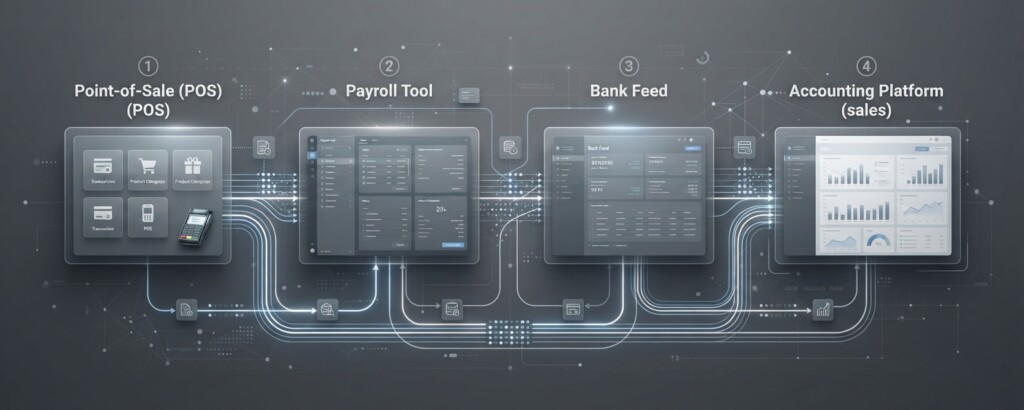
Most businesses close their books slowly not because their team is inefficient, but because the underlying data flows are fragmented. Transactions sit in different systems — a point-of-sale platform, a payment processor, an inventory tool, a payroll provider — and pulling them together into a coherent picture requires a lot of manual intervention. Someone has to export a CSV here, reconcile a discrepancy there, and chase a department head for a missing expense receipt.
Close your books faster every month.
BrizoConsol streamlines your month-end consolidation so your team spends less time on manual work.
Common bottlenecks include: bank reconciliation across multiple accounts, matching purchase orders to supplier invoices, consolidating sales data from multiple channels, accruals and prepayments, intercompany transactions, and producing the final management accounts. Each task on its own is manageable; when they all pile up at the same time, the pressure is significant.
Which Tasks Are Actually Automatable
Not everything in a month-end close can or should be automated. Judgement calls — like whether an unusual expense should be capitalised or expensed, or how to handle a disputed invoice — still need a human. But a substantial portion of the close process is rules-based and repetitive, which makes it a strong candidate for automation.
| Task | Automation Potential | Typical Tool Type |
|---|---|---|
| Bank reconciliation | High | Accounting software rules / integration |
| Sales data aggregation | High | Data integration / ETL pipeline |
| Accounts payable matching | Medium–High | Invoice processing automation |
| Payroll journal entries | High | Payroll–accounting integration |
| Accruals and prepayments | Medium | Scheduled journal automation |
| Intercompany reconciliation | Medium | Consolidation software |
| Management report generation | High | Reporting automation / dashboards |
| Expense categorisation | Medium | Expense tools with ML classification |
| Chasing missing approvals | Medium | Workflow automation / notifications |
The distinction between ‘medium’ and ‘high’ potential often comes down to data quality. Automation is only as reliable as the data it works with. If your sales figures come from three different platforms and each formats product codes differently, an automated reconciliation will still fail until you sort out the data mapping. This is where many businesses underestimate the upfront effort.
Building a Practical Automation Layer
The goal isn’t to buy a single piece of software that does everything — that product doesn’t exist for most SME use cases. Instead, the realistic approach is to build a small automation layer between your existing systems, reducing the manual handoffs that cause delays.
A useful way to frame this: instead of asking ‘which software should we buy?’, ask ‘where are humans currently doing work that a system could do instead?’ Map the steps in your current close process, mark each one that involves copying, pasting, exporting, emailing, or waiting, and those become your priority automation candidates.
For most growing businesses, the highest-return starting points are: connecting your sales and payment platforms directly to your accounting system, automating bank feed matching with clear rules, and setting up scheduled reports so that management accounts are generated automatically rather than built from scratch each month.
Tools like Xero, QuickBooks, and Sage already offer bank feed automation and basic rule-based transaction matching. The gap for many businesses is upstream — getting clean, consistent data into those tools without manual re-entry. That’s where integration middleware or purpose-built connectors become important.
The Data Quality Problem You Have to Solve First
Automating a broken process just produces wrong answers faster. Before building any automation into your close process, you need consistent data standards across your systems. This means: agreed product or SKU codes used across inventory, sales, and accounting; consistent customer and supplier identifiers; clear cut-off rules for when transactions are recorded; and documented handling for edge cases like refunds, credit notes, and foreign currency transactions.
Do not automate your reconciliation process if your chart of accounts is inconsistently applied across departments or entities. Automation will lock in those inconsistencies and make them harder to identify. Fix your categorisation standards first, document them clearly, and then build the automation on top of a stable foundation.
This data preparation work is often the most time-consuming part of an automation project — but it delivers benefits beyond just the close process. Clean, consistent data makes your management reporting more reliable, your VAT and tax filings easier to review, and any future system migrations significantly less painful.

A Realistic Timeline and What to Expect
Businesses that approach month-end automation sensibly typically see meaningful time savings within three to six months. The first month is usually spent mapping the current process, identifying the top three or four bottlenecks, and sorting out data issues. The second and third months involve building and testing the integrations or rules. By month four, the team is running the new process with the automation in place and identifying what still needs refinement.
| Hours spent on manual bank reconciliation per month (before) | 12 hrs |
| Hours spent on sales data aggregation per month (before) | 8 hrs |
| Hours spent generating management reports (before) | 6 hrs |
| Total monthly hours (before automation) | 26 hrs |
| Estimated hours after automation (ongoing review and exceptions) | 7 hrs |
| Time saved per month | 19 hrs |
These numbers are illustrative, but they reflect what finance teams in businesses with £2m–£20m turnover report when they implement basic integration and reconciliation automation. The savings aren’t from eliminating the finance function — they’re from redirecting experienced staff away from data plumbing and towards review, analysis, and decision support.
Automation Tools Worth Knowing About
The right toolset depends on your existing systems and the specific gaps in your process, but here are categories worth investigating:
- Integration platforms (such as Make, Zapier, or purpose-built finance connectors) that move data between systems on a schedule or trigger
- Accounting software with strong rule-based matching — most modern platforms offer this, but the rules need configuring carefully
- Invoice processing tools that extract data from supplier invoices using OCR and match them to purchase orders automatically
- Payroll integration modules that post payroll journals directly to your accounting system without manual re-entry
- Reporting and dashboarding tools that pull from your accounting system and generate standard reports on a schedule
- Workflow tools that automate approval reminders and escalations so that missing sign-offs don’t delay the close
- Consolidation tools for businesses with multiple entities that need to combine accounts and eliminate intercompany transactions
No single tool covers all of these. Most businesses end up with a small stack — their core accounting platform, an integration layer to bring in external data cleanly, and a reporting layer to distribute results. The key is ensuring these layers are connected with reliable, documented data flows rather than manual steps or undocumented spreadsheet bridges.
Where Businesses Get Stuck
The most common failure mode isn’t choosing the wrong software — it’s starting with automation before the process is understood. Teams rush to connect systems without documenting the current steps, and then find that the automated version replicates old problems or creates new ones that are harder to diagnose.
A second common issue is building automation that nobody maintains. Integration rules need to be updated when a supplier changes their invoice format, when a new product line is added, or when the chart of accounts is restructured. If there’s no clear owner for the automation layer, it degrades over time and eventually gets bypassed in favour of manual workarounds — which defeats the purpose entirely.
Finally, some businesses underinvest in testing. Running an automated reconciliation in parallel with the manual process for two or three months before retiring the manual version catches edge cases that weren’t anticipated during setup. It takes longer upfront but prevents costly errors in live reporting.
What Good Looks Like
A well-automated month-end close for an SME doesn’t mean a fully hands-off process. It means your finance team spends the close period reviewing exceptions, approving judgement items, and interpreting results — rather than copying data between spreadsheets. It means your management accounts are available within three to five working days of month-end, not ten to fifteen. It means your team can handle growth in transaction volume without a proportional increase in headcount.
Getting there requires a clear picture of your current process, honest assessment of your data quality, and a phased approach to automation that builds reliability before adding complexity. The businesses that do this well typically start small — automating one or two high-impact tasks — prove the value, and then extend the approach systematically. That’s a more sustainable path than buying a comprehensive platform and trying to implement everything at once.
Struggling with Manual Month-End Processes?
If your finance team is spending too much time on data wrangling rather than analysis, we can help you identify where automation will have the most impact and how to build reliable data flows between your systems.