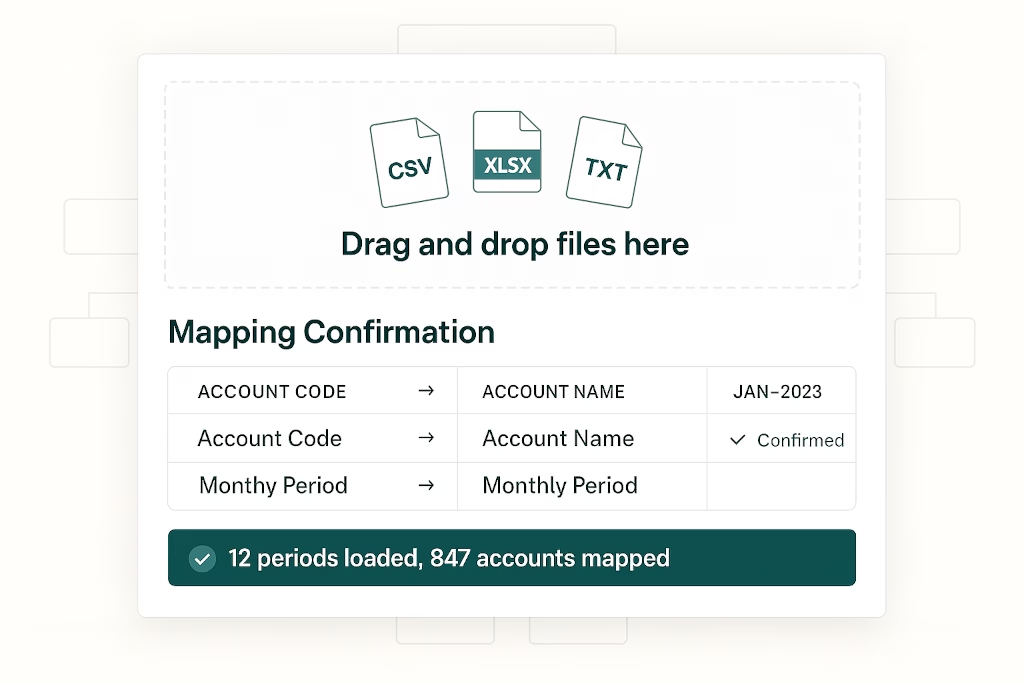
Upload Any Financial Export. BrizoSystem Figures Out the Rest.
Every accounting system exports data differently. Xero uses two-row headers. QuickBooks exports ledger detail. Some clients send a tidy monthly trial balance; others send a multi-sheet workbook with one period per tab. And then there’s the firm that emails a CSV with columns labelled “Period A,” “Period B,” “Q1.”
BrizoSystem’s revamped financial upload is built for all of it — not just one fixed template.
The system classifies your file, proposes the mapping, asks you to confirm anything uncertain, then converts everything into month-level Trial Balance records ready for reporting and consolidation.
What You Can Upload
BrizoSystem accepts CSV, Excel (.xls / .xlsx), TXT, and TAB files — up to 12 files per upload, 10 MB per file. Excel temporary files (the ones starting with ~$) are automatically ignored.
What matters is not the file type — it’s what’s inside. The upload engine is designed to handle the formats accounting teams actually work with:
Standard Trial Balance with period columns Accounts down the rows, months across the columns — Jan, Feb, Mar-2025, 2025-01. Period headers are detected automatically regardless of formatting style.
Opaque period columns Columns labelled Month1, Month2, Period A, Q1. The AI maps each generic column to the actual reporting period without requiring a reformatted file.
Two-row Excel headers The first row contains a year range, the second row contains month names — the format Xero and several other platforms use by default. BrizoSystem handles the stacked header structure natively.
Multi-sheet workbooks Each worksheet is one period, named Jan 2025, Feb 2025, and so on. Sheet names are used as period labels automatically.
Single-period balance lists One sheet, one month — typically titled something like As at Apr 2026. If the period is not clear from the file, the system asks you to confirm it before proceeding.
Paired P&L + Balance Sheet workbooks A workbook with one Profit and Loss sheet and one Balance Sheet sheet, both covering the same reporting periods across the columns. BrizoSystem converts the two statements together into Trial Balance balances. Note: a standalone P&L-only or Balance Sheet-only file is not accepted — both statements must be present for the same periods, because together they form a complete Trial Balance.
Transaction detail / general ledger exports Rows are individual postings with account, date, and debit/credit amounts. BrizoSystem rolls these up into monthly Trial Balance rows automatically.
How the Upload Works
1. Drop your files
Open Upload Actual Financials from the data load page and drag in your files. The browser validates file type, count, and size before anything is sent to the server.
2. AI classifies the file and proposes the mapping
This is where the revamped upload engine does its work. The AI performs a structure pass — classifying the file layout, detecting reporting periods, identifying the best-fit template, and proposing the sheet and column mapping. It identifies which column is the account code, which is the account name, which columns carry the period data, and how debits and credits are represented.
3. You confirm before anything is extracted
The proposed mapping is shown to you for review. You can accept it as-is or adjust any part of it — sheet selection, account code column, account name column, debit/credit columns, signed amount column, or Dr/Cr side column. If month headers only show Jan, Feb without a year, the system asks you to confirm the reporting year. Nothing is extracted until you confirm.
4. The system extracts, validates, and loads
After confirmation, the deterministic reader extracts rows using the confirmed mapping, aggregates by account code into Trial Balance rows, and validates the reporting period window. Empty or zero-only imports are rejected. If new accounts are found that don’t yet exist in your chart of accounts, you’re asked to confirm or adjust their classifications. If a retained earnings account is required but missing, you’re prompted to provide one.
Existing data for any loaded month is replaced cleanly. The system then recalculates balances and movements, and triggers auto-elimination processing automatically.
5. Success banner confirms what was loaded
The result screen shows the file classification, the columns used, the periods loaded, and any warnings — so you know exactly what went in and where to look if anything needs attention.
Sample Files — What Real Uploads Look Like
To give you a concrete picture, here are the kinds of files BrizoSystem handles in practice:
| File | Layout Type |
|---|---|
| BrizoDemo_MonthlyTrialBalance_FY2025_SGD.xlsx | Standard TB — accounts in rows, months in columns |
| BrizoDemo_CumulativeTrialBalance_FY2025_SGD.xlsx | Cumulative TB — same layout, YTD balances |
| DemoCompany_Global_TrialBalance_MultiPeriod_2025-2026.xlsx | Multi-period TB spanning two financial years |
| DemoCompany_Global_TrialBalance_YTD_Apr2026.xlsx | Single YTD period — period confirmed from title |
| GeneralLedger_Transactions_2024-2025.xlsx | Transaction detail — rolled up to monthly TB rows |
| financial_statements_FY2024_v3.xlsx | Paired P&L + Balance Sheet — converted to TB |
| TrialBalance_Sep2019.csv | Standard CSV TB — comma-delimited |
| TestCompany_ChartOfAccounts.xlsx | Chart of accounts reference — used during account mapping |
Every one of these passes through the same AI structure pass and confirmation step before data is extracted.
Why This Matters for Accounting Firms
The old way of handling client uploads was either a fixed template that clients complained about, or a manual reformatting step before every import. Neither scales.
BrizoSystem’s upload engine removes the reformatting burden from your team. Clients can send exports directly from Xero, QuickBooks, MYOB, Zoho, or any other platform — and the system adapts to the structure rather than demanding the structure conform to a rigid template.
The confirmation step keeps your team in control. The AI proposes; you approve. No data is loaded silently and no mapping is assumed without your sign-off.
Cleaner Uploads. Faster Close. More Time for Advisory.
Whether you’re loading a single entity’s monthly TB or onboarding a multi-period group with legacy data, BrizoSystem’s financial upload handles the complexity so your team doesn’t have to.