Every consolidation has the same risk: an intercompany balance that slipped through. A receivable in one entity that was never matched to the payable in another. A months-old difference sitting quietly in consolidated equity because no one caught it at close.
Manual intercompany reconciliation relies on someone knowing which accounts to check, across which entities, for which periods. At scale, that’s not a process — it’s a hope.
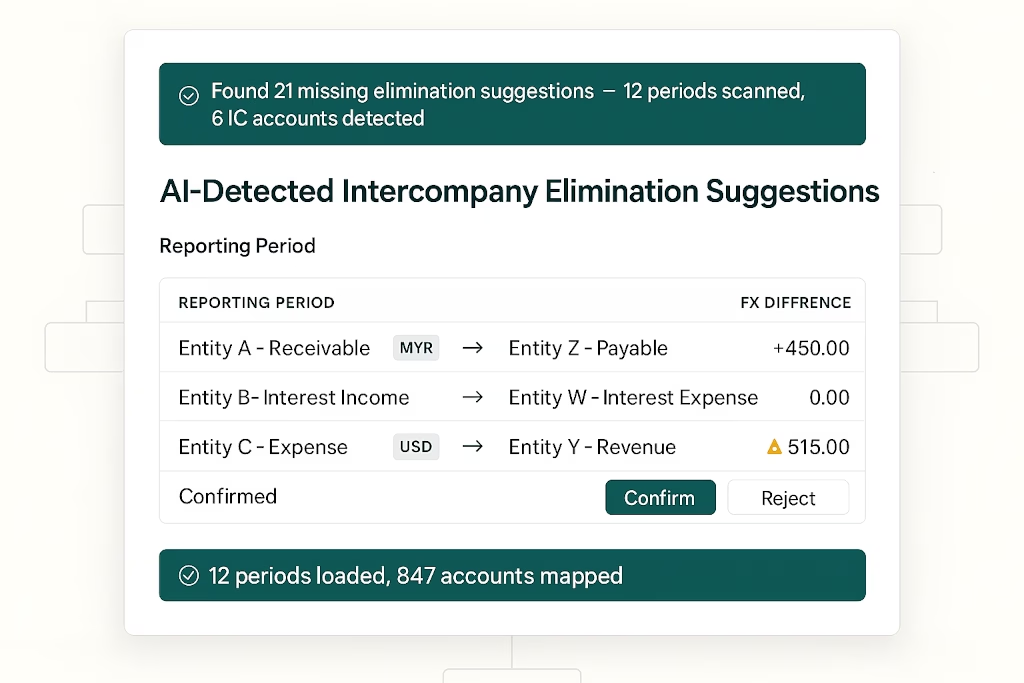
BrizoElim changes the approach entirely. The AI scans your trial balance for intercompany-looking accounts, identifies uneliminated balances across the group, and surfaces suggested elimination entries — ready for your review and one-click confirmation.
Intercompany eliminations without the manual work.
BrizoConsol identifies and eliminates intercompany balances automatically at consolidation.
The Problem With Manual Intercompany Detection
In a group with five or more entities, intercompany balances accumulate fast. Accounts receivable in one entity paired against accounts payable in another. Intercompany loans accruing interest. Shared service charges crossing entity lines every month.
Tracking these manually means:
- Maintaining a separate intercompany reconciliation schedule outside the consolidation tool
- Relying on preparers to know which account codes are intercompany in nature
- Catching FX differences on cross-currency intercompany balances only after posting
- Discovering missed eliminations during review — or worse, during audit
BrizoElim replaces the manual scan with an AI-driven detection run.
How BrizoElim Works
1 Configure the detection run
From the Elimination Entries screen, triggering Detect Missing Eliminations opens a configuration dialog. You set the scenario (Actual, Budget, or Forecast), the accounting standard (All standards, IFRS, or US GAAP), the date range to scan across, and a materiality amount — eliminations below the threshold are suppressed from results, keeping the output focused on what matters.
The detection is targeted, not a brute-force scan of every line in the trial balance. BrizoElim asks the AI to identify intercompany-looking accounts from COA metadata, then scans trial balance balances for only those accounts. Click Run Detection to start.
2 Review suggested eliminations by period
Results surface as a grouped list — one section per scanned period — so you can work through eliminations chronologically without losing context. Already-handled and below-materiality entries are automatically suppressed, keeping the list clean.
Each suggested elimination is presented as a fully drafted entry with an auto-generated ID (e.g. AI-ELIM-202506-d413fb), the period end date automatically applied, the accounting standard (editable per entry), and debit and credit lines pre-populated with the matched intercompany accounts, organisations, currencies, exchange rates, and amounts.
FX differences are surfaced immediately where cross-currency balances exist, with the FX Gain/Loss account pre-assigned. Where the currency difference exceeds materiality, BrizoElim flags it explicitly with a warning — prompting you to check the FX treatment before confirming.
In a June 2025 example: Demo Service Company’s SE-1300 Intercompany account (USD) is matched against Demo Sales Company’s SA-2300 Intercompany account (SGD at 1.3355). The debit total is 9,700.00; the credit translates to 12,954.35; the FX difference of -3,254.35 is routed to the designated FX account automatically. No manual calculation required.
3 Confirm or reject each suggestion
Every suggested entry has two actions: Confirm or Reject. You can also add lines, adjust amounts, or change the FX account before confirming. Nothing is posted until you make a deliberate choice. The period summary bar shows the running tally — suggestions, handled, notes, suppressed — so you always know where you stand across the full detection run. Run Again lets you re-scan after making changes.
What BrizoElim Catches That Manual Processes Miss
| Scenario | Manual process | BrizoElim |
|---|---|---|
| Intercompany account in a new entity not yet in the reconciliation schedule | Missed until audit | Detected from COA metadata |
| FX difference on cross-currency intercompany balance | Manually calculated — often wrong | Auto-calculated, FX account pre-assigned |
| Below-materiality intercompany balances cluttering the review | Reviewed line by line | Suppressed by materiality threshold |
| Historical periods with unhandled intercompany balances | Requires separate historical review | Covered in one detection run across any date range |
| Already-handled eliminations cluttering results | No filtering | Already-handled items automatically suppressed |
Where BrizoElim Sits in the Workflow
BrizoElim is part of BrizoConsol’s Adjustments module, alongside Auto Elimination, CTA, NCI, Journal Entries, and Elimination Validation. After confirming suggested entries, balances flow directly into the consolidated financial statements — with a full audit trail on every AI-generated elimination ID.
It does not replace the human review step. It replaces the human detection step — which is the part that takes the most time and carries the most risk of error.
💡 The distinction that matters: BrizoElim detects what you might have missed. Auto Elimination handles what you know exists. Together, they give finance teams systematic coverage — AI-powered detection for the unknown misses, rule-based automation for the known recurring eliminations.
BrizoElim is available as part of BrizoConsol’s Pro features. The detection runs. The entries are drafted. You review and confirm. Learn more or see it in action →